|
|
* Depth
budget reporting
* Many
disparity logging options
* Video
parameters logged
* Logs
parameters to a Rich Text File
* Timecode
stamps for all events
* Live
report generation
* Thumbnail
pictures option
* User
set test profiles saved or exported
* Media
files in most 3D formats or containers
* Works
with standard capture cards or devices
* Live
sources with timecode capture
|
 |
|
|
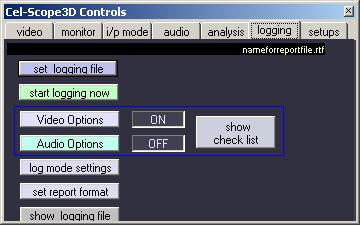
The logging option adds
comprehensive reporting and analysis functions to the overall
measurement and display facilities of the Cel-Scope3D basic
analyser. A log report is a finished document with all the events,
measurements and system settings plus with timecode and optional
thumbnail pictures from the media being evaluated.
The system works with live sources
via capture cards or with S3D media files. Either uncompressed or
compressed file types of most flavours can be checked. The system
analyses and tests the content according to a list of preset
parameters and limits set to the users needs. These are selected in
a set of menus for 3D, video and audio options under the analysis
tab. Any combination of available tests can be configured. There are
also selectable options for the actual report format, style and
imbedded thumbnail picture options alongside the timecode reference
stamps. All reports are generated in RTF (RichText Format) which can
be edited, opened or printed from within Cel-Scope3D or MS Word and
most other word processors. Additionally there is an option to
export all the generated test data into a CSV file that can be read
and analysed off-line within a MS Excel spreadsheet. An Excel tool
is supplied to generate depth charts showing trends on a timeline.
Report Formatting
All reports feature a header that
lists media information, date and software version and also all the
test and limit settings for each parameter. Optionally, a headed
notepaper template can be used as part of the user setup so that the
report is client ready.
The report shows IN and OUT
timecode points for each detection over the set limits. At the end
of each report is a summary of the total number of parameter test
fails or events for quick overall assessment.
Live or Media File playout and
logging is in real-time. Embedded audio, stereo or multi-channel
surround-sound can be extracted and monitored along with any video
or analysis displays. On stopping, the finished report is ready for
review or printing. |
3D
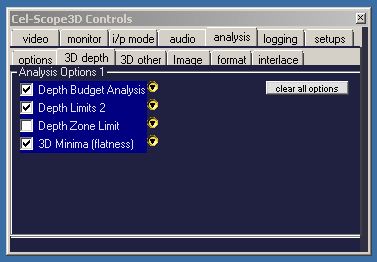
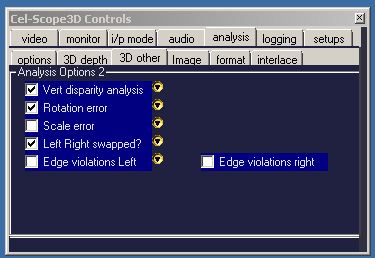
LOGGING ANALYSIS OPTIONS MENU
|
|
|
Testing Depth Budgets
Each test parameter can be individually selected and setup according
to its own parameter menu. All disparity settings can either be in
pixels or screen percentage.
Depth budget analysis can be set for maximum positive disparity
(behind the screen), negative disparity limits and range allowable
within the set budget. A hold-off frame count can be set to ignore
short duration excursions over the limits.
The Depth Limit2 settings allow a second (different) set of limits
with a perhaps stricter frame hold-off count to catch never-exceed
excursions. The Depth Zone Limit setting does yet another set of
tests for a specific (zoned) area of the image. This can be used for
caption requirements.
Flat looking or 2D-only sequences can be detected and logged by the
3D Minima option. This sets a minimum disparity that should occur
with a given frame count.
Similarly, other logging settings can be preset as required by the
production standards and final purposes of the media being tested.
These settings can be saved and recalled from profile files on
demand.
|
3D ANALYSIS & CHECKS
* Depth
budget excursions
* Depth
budget out of range
* Major
violations of depth
* Zoned
area depth check
* 3D
too flat – looks 2D
* Left/Right
eyes reversed
* Vertical
disparity errors
* Rotational
alignment errors
* Left
/ Right scaling/zoom
* Edge
Violation detection
* Focus
disparity
VIDEO TESTS & CHECKS
* Black
frames
* Left/Right
colour balance
* Left/Right
Black level
* Quantisation
* Colour
Balance Differences
* Monochrome
* Contrast
matching
* Colour
Bars
* Gamut
Errors
* Image
Format checks
EXTENDED TEST OPTIONS
* PSE
photo sensitive epilepsy
* PSE
white flashes
* PSE
red flashes
* PSE
spatial patterns detect
And there are Audio Checks Too!
|